Samarthwbgovin – Complete Guide to Using the Website in 2026
Finding the right information online can be difficult when a website contains multiple pages, services, forms, or informational sections. Samarthwbgovin is a term that users may search for when looking for information associated with the website and its available online resources.
This complete guide explains how users can approach Samarthwbgovin in 2026, how to navigate its website, find relevant information, and avoid common mistakes while using online services.
What Is Samarthwbgovin?
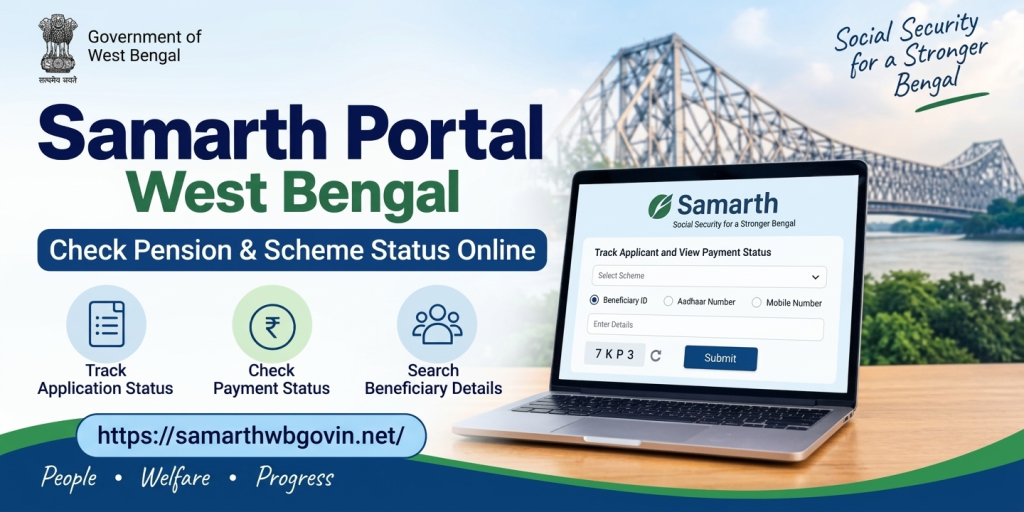
Samarthwbgovin refers to the website name or search term associated with the Samarthwbgovin domain. When visiting any online portal, users should first review the homepage to understand the purpose of the website and the information currently available.
Website layouts and available pages can change over time. Therefore, users should always check the latest information displayed on the website rather than relying on older screenshots, guides, or third-party information.
Before using a particular service, carefully read the instructions provided on the relevant page.For additional information about the SAMARTH platform and its related online services, users should also check the relevant official portal or educational institution website before relying on any instructions.
Samarthwbgovin Guide 2026
The Samarthwbgovin guide 2026 is intended to make website navigation easier for new and returning users.
The first step is to open the correct website address in a trusted web browser. Once the homepage loads, review the main navigation menu and available sections.
Look for clearly labeled categories that match the information you are trying to find. If the website includes a search function, using specific keywords can help you locate the relevant page faster.
How to Use Samarthwbgovin
Using a website effectively does not require complicated steps. A simple approach can help you find information without wasting time.
1. Open the Correct Website
Start by entering the correct website address into your browser. Check the spelling carefully before proceeding.
This is particularly important when several websites have similar names or domains.
2. Review the Homepage
After opening the website, spend a few moments reviewing the homepage.
Look for the navigation menu, important announcements, featured sections, and links to other pages. This can help you understand how the website is organized.
3. Choose the Relevant Section
Select the section that matches your requirement.
If you are looking for a particular form, announcement, service, or informational page, use the website’s navigation menu or search feature whenever available.
4. Read the Instructions
Before completing a form or following an online process, read the instructions carefully.
Check which information is required and whether the page provides any specific submission guidelines.
5. Review Your Information
If you need to enter information into an online form, review everything before submitting it.
Correct spelling, dates, numbers, and other details carefully. This simple step can help prevent avoidable errors.
Important Sections to Check
When exploring Samarthwbgovin, users should pay attention to the main informational sections available on the website.
These may include:
- Homepage
- About section
- Online services
- Forms or applications
- Announcements
- Frequently Asked Questions
- Contact information
- Privacy Policy
- Terms and conditions
- Help or support information
The exact availability and names of these sections can change, so always refer to the current website structure.
How to Find Information Quickly
One of the easiest ways to navigate a website is to use its search function if one is available.
Instead of searching with a very broad phrase, use specific terms related to the information you need. For example, if you are searching for a particular application, use the application name rather than simply searching for “information.”
You can also use your browser’s built-in search feature.
On a Windows computer, pressing Ctrl + F allows you to search for a word or phrase on the current page. This can be especially useful when a page contains a large amount of text.
Using Samarthwbgovin on Mobile
Many users prefer accessing websites from smartphones. A modern mobile browser can make it convenient to view online information while away from a computer.
When using Samarthwbgovin on mobile, check whether the navigation menu, buttons, and forms display correctly.
If a page does not load properly, refresh the browser and try again. You can also try another updated browser if the problem continues.
Avoid entering personal information until you have confirmed that you are on the correct website.
Common Problems While Using Websites
Users may occasionally experience technical problems when accessing online portals. Many of these issues can be resolved with simple troubleshooting.
Website Not Opening
If the website does not load, first check your internet connection.
After confirming your connection is working, refresh the page and try again. A temporary technical issue may also resolve itself after some time.
Website Loading Slowly
Slow loading can sometimes be caused by an unstable internet connection, browser issues, or temporary server traffic.
Closing unnecessary browser tabs and refreshing the page may help.
Form Is Not Submitting
If an online form does not submit, carefully review all required fields.
Make sure the information has been entered in the expected format and that no required field has been left blank.
Page Looks Different
Websites can receive design updates. A page that looks different from an older screenshot may simply have been redesigned.
Always prioritize the current instructions displayed on the website.
Safety Tips for Using Samarthwbgovin
Being careful with personal information is important whenever you use an unfamiliar website.
Before submitting information, verify the website address in your browser’s address bar. Avoid entering unnecessary personal information.
You should also read the website’s privacy information when available. Understanding how information is handled can help you make better decisions about what to submit.
Never rely solely on an old article or screenshot if the current website provides different instructions.
When checking admission or education-related information, it is recommended to verify important details through the relevant official educational institution or government website.
Benefits of Following the Latest Information
Online websites can change frequently. Menus may be redesigned, forms can be updated, and information can become outdated.
Following the latest instructions can help you avoid confusion.
It is also useful to check dates on announcements and informational pages. If two sources provide different instructions, the newer and more authoritative information should be reviewed first.
Frequently Asked Questions
What is Samarthwbgovin?
Samarthwbgovin is the website name or search term users may use when looking for information associated with the Samarthwbgovin website.
How can I use Samarthwbgovin?
Open the correct website, review the homepage, select the relevant section, and carefully follow the instructions provided on the current page.
Can I use Samarthwbgovin on my phone?
You can access websites through a modern mobile browser when the website supports mobile browsing. The exact experience depends on the current website design.
What should I do if Samarthwbgovin is not working?
Check your internet connection, refresh the page, and try an updated browser. If the issue appears temporary, try accessing the website again later.
Should I follow old screenshots or guides?
It is better to follow the latest information available on the current website because pages, menus, and procedures can change.
Final Thoughts
Samarthwbgovin – Complete Guide to Using the Website in 2026 provides a simple starting point for users who want to navigate the website efficiently.
The most important steps are to verify the correct website, review its current information, follow the instructions carefully, and check your details before submitting anything.
As online portals continue to change, keeping your information up to date and relying on current website instructions can make the overall experience much easier and more reliable.