Samarth Status Check 2026 – How to Check Application & Beneficiary Status
The Samarth Status Check 2026 process is useful for applicants and beneficiaries who want to understand the current position of their application or verify information related to West Bengal’s SAMARTH social-pension platform.
SAMARTH is an initiative of the Government of West Bengal described on its official portal as an umbrella scheme for the state’s social pension schemes. The official portal provides a login facility using a registered mobile number, captcha, and password.
One important point is that the official SAMARTH portal currently presents its main access through login rather than a publicly indexed standalone “check status” page. Therefore, users should avoid unofficial websites claiming to provide direct beneficiary-status access and should use the official portal or the relevant government department for verification.
What Is Samarth Status Check 2026?
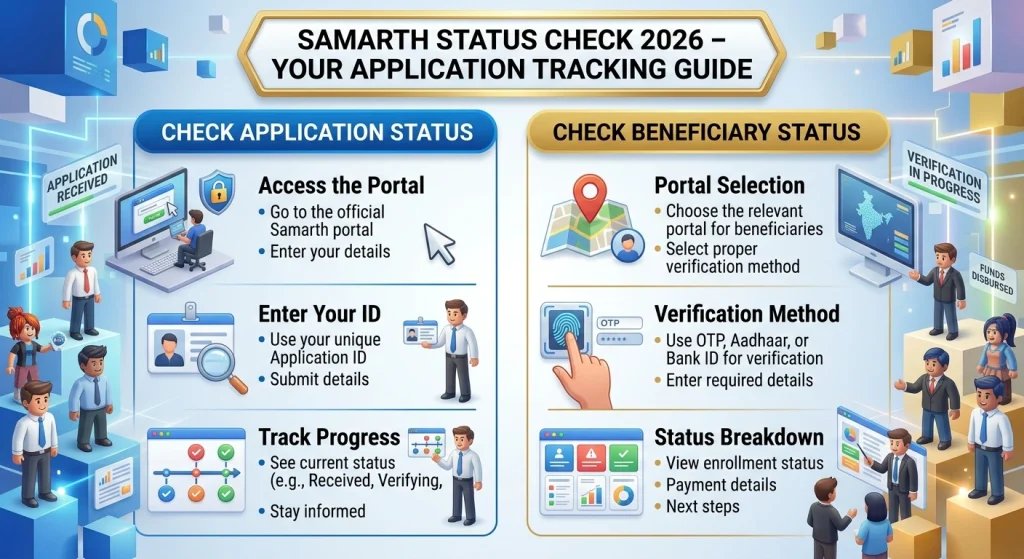
Samarth Status Check 2026 refers to checking information related to an application or beneficiary record associated with the SAMARTH system.
The SAMARTH portal is maintained for the Government of West Bengal, with the site stating that its content, data, processes, and operations are owned and maintained by the Finance Department of the Government of West Bengal. It is designed by the National Informatics Centre (NIC).
Depending on the service and the applicant’s access, status-related information may help users understand whether their application or beneficiary record requires further action.
What Is the SAMARTH Portal?
SAMARTH is presented by the Government of West Bengal as an “One Umbrella Scheme” for the state’s social pension schemes. The official portal provides a secure login page for registered users.
The official login page currently asks users to provide:
- Registered mobile number
- Captcha
- Password
It also provides a Forgot Password option.
How to Check Samarth Status in 2026
If you already have access to the SAMARTH portal, follow these general steps.
Step 1: Open the Official SAMARTH Portal
Start by opening the official Government of West Bengal SAMARTH portal.
The official login page is:
Always check that you are using the official government domain before entering login information.
Step 2: Enter Your Registered Mobile Number
The SAMARTH login page provides a field for the registered mobile number. Enter the mobile number associated with your account.
Step 3: Complete the Captcha
Enter the captcha displayed on the official page.
If the captcha is difficult to read, use the refresh option provided on the portal.
Step 4: Enter Your Password
Enter your SAMARTH account password in the appropriate field.
Do not share your password or login credentials with another person.
Step 5: Log In
Select the login option to access your account.
After successful authentication, the information and services available to your account can be reviewed from the portal.
How to Check Application Status
The exact status options available can depend on the particular scheme or service connected with your application.
This is important because SAMARTH is an umbrella platform rather than a single standalone application-status service for every West Bengal government scheme.
If your particular application belongs to another government department or scheme, its official website may provide a separate application-tracking facility.
For example, West Bengal government portals for specific services can provide dedicated application tracking. The Health & Family Welfare Department has an official application-tracking page where applicants enter an application number to view status details.
Therefore, use the status facility belonging to the specific scheme or department that processed your application.
How to Check Beneficiary Status
Beneficiary status can depend on the specific social-pension scheme and the information available through the relevant government system.
If your beneficiary record is connected with SAMARTH, first log in through the official portal using your registered credentials.
After logging in, review the available account or scheme information.
If you cannot find the required status information, do not enter your personal information on an unrelated third-party website. Instead, contact the responsible department or official service channel.
What Information May Be Needed?
Before checking your application or beneficiary information, keep your relevant records available.
Depending on the scheme, you may need information such as:
- Registered mobile number
- Application number
- Beneficiary information
- Registration details
- Scheme-related identification details
- Login credentials
The exact requirements vary according to the service.
For example, some West Bengal government status portals require an application number, while others may use a different identifier.
What Does Application Status Mean?
Application status tells you what stage your application has reached.
Common status descriptions on government portals can include:
| Status | General Meaning |
|---|---|
| Submitted | Application has been submitted |
| Under Review | Application is being examined |
| Approved | Application has received approval |
| Rejected | Application was not approved |
| Pending | Further processing is still required |
| Returned | Additional information or correction may be required |
The exact terminology used by SAMARTH or an individual scheme can differ, so always rely on the status description shown on the official portal.
What If Samarth Status Is Not Showing?
If you cannot find your status after logging in, there may be several reasons.
1. Your Application Is Still Being Processed
Some applications require verification before their status changes.
2. You Are Checking the Wrong Government Portal
West Bengal has multiple online services, and each department may operate its own status-tracking system.
3. Your Details Do Not Match
An incorrect application number, mobile number, or other information may prevent you from finding the relevant record.
4. The Service Uses a Separate Status Page
Some government schemes provide their own application-tracking facility rather than displaying every status through a general portal.
5. Temporary Technical Issues
A government website may occasionally experience maintenance or technical problems.
Samarth Status Check Without Login
Users often search for ways to perform a Samarth Status Check without login.
However, the official SAMARTH portal currently shows a login process requiring a registered mobile number, captcha, and password.
Therefore, you should not assume that an unofficial website offering a “no-login SAMARTH status check” is an official service.
If you have forgotten your password, the official SAMARTH login page provides a Forgot Password option.
What If You Forgot Your SAMARTH Password?
You do not need to create a new account simply because you forgot your password.
Open the official SAMARTH login page and use the Forgot Password option displayed below the login fields.
Follow the recovery process provided by the official portal.
Avoid sharing your password, OTP, or other confidential login information with anyone claiming to provide faster status checking.
How to Check if Beneficiary Information Is Correct
After accessing the relevant official account or status page, carefully review the information displayed.
Check details such as:
- Beneficiary name
- Scheme information
- Application details
- Status
- Payment-related information, where available
- Registered contact information
If something appears incorrect, use the official department’s correction or grievance process instead of relying on an unofficial service.
Samarth Status and Payment Information
Status and payment information are not necessarily the same thing.
An application may have been approved while payment information is updated separately according to the relevant scheme’s process.
Therefore, if you want to know whether a particular payment has been released, check the payment-related information provided by the responsible government department or scheme.
Do not treat an “approved” status as automatic confirmation that a payment has already reached your bank account.
Is Samarth Status Available Online?
Yes, SAMARTH provides online access through its official portal, but the exact information available depends on the user’s account and the associated scheme.
The official SAMARTH page currently provides a login facility and identifies the platform as belonging to the Government of West Bengal.
For a specific application, however, you should confirm whether the relevant department provides its own dedicated tracking service.
Difference Between Application Status and Beneficiary Status
These terms are related but can describe different stages.
Application status generally concerns the progress of an application submitted for a service or scheme.
Beneficiary status generally concerns a person who has been recorded as receiving or being eligible for a particular benefit.
For example:
| Application Status | Beneficiary Status |
|---|---|
| Concerns an application | Concerns beneficiary records |
| Shows application progress | Shows beneficiary-related information |
| Usually linked to an application | Usually linked to an approved/registered beneficiary |
| May change during verification | Can depend on eligibility and ongoing verification |
The exact terminology depends on the scheme.
Important Safety Tips for Samarth Status Check
When checking government application or beneficiary information online, follow these basic precautions:
- Use the official government website.
- Check the domain before entering information.
- Never share your password.
- Never share OTPs with other people.
- Avoid unofficial websites requesting unnecessary personal information.
- Keep your application records safely stored.
- Use official department contact channels if information is incorrect.
The SAMARTH privacy policy also advises users to verify information and explains that the portal’s content should not be treated as a legal statement.
Frequently Asked Questions
What is Samarth Status Check 2026?
Samarth Status Check 2026 refers to checking application or beneficiary-related information associated with the Government of West Bengal’s SAMARTH platform and its connected social-pension services.
How do I log in to the SAMARTH portal?
Open the official SAMARTH login page and enter your registered mobile number, captcha, and password.
Can I check Samarth status without a password?
The official SAMARTH login page currently requires login credentials. If you have forgotten your password, use the official Forgot Password option.
Can I check my application status through SAMARTH?
This depends on the particular scheme and service. Some West Bengal government services have separate application-tracking portals, so applicants should use the official status facility for the department or scheme handling their application.
What should I do if my beneficiary status is not available?
First confirm that you are using the correct official portal and that your account details are correct. If the information is still unavailable, contact the relevant government department or official service center.
Is the SAMARTH website official?
Yes. The official SAMARTH website identifies itself as a Government of West Bengal portal and states that its content, data, process, and operation are owned and maintained by the Finance Department of West Bengal.
Official Samarth Resources
For the safest and most accurate information, use the official Government of West Bengal SAMARTH portal.
SAMARTH Official Login:
Open SAMARTH Official Login
SAMARTH Privacy Policy:
View SAMARTH Privacy Policy
Final Words
The Samarth Status Check 2026 process can help applicants and beneficiaries access information connected with West Bengal’s SAMARTH social-pension platform. The official portal currently provides a login system using a registered mobile number, captcha, and password.
Because different West Bengal government schemes can have their own application-tracking systems, it is important to use the official status facility associated with your particular application. Avoid third-party websites that request unnecessary personal or login information.
For the most reliable information, always verify your application or beneficiary details through official Government of West Bengal services.